How to Make a Minecraft Server in India (2026 Complete Guide)
Introduction
Setting up a Minecraft server in India involves more than just downloading files and clicking "start." Whether you're planning a small private server for friends or aiming to build the next mcFleet.net, understanding the technical requirements, costs, and available options is critical to success.
This comprehensive guide walks through every method of creating a Minecraft server in India, from completely free solutions to professional managed hosting. We'll cover the actual costs, technical requirements, common problems Indian server owners face, and realistic expectations for each approach.
By the end of this guide, you'll understand which method suits your needs, budget, and technical skill level.
Table of Contents
- Quick Comparison: All Methods
- Method 1: Self-Hosting on Your Computer
- Method 2: Free Server Hosting
- Method 3: Professional Managed Hosting
- Hardware Requirements by Player Count
- Common Problems in India
- Which Method Should You Choose?
- FAQ
Quick Comparison: All Methods
Before diving into specifics, here's an honest comparison of every way to host a Minecraft server in India:
| Method | Cost | Technical Difficulty | Max Players | Uptime | Best For |
|---|---|---|---|---|---|
| Self-Hosting (PC) | Free (electricity) | High | 5-10 | Poor (when PC off) | Learning, testing only |
| Free Hosting | Free | Low | 10-20 | Very Poor | Temporary servers |
| Budget Hosting | Rs. 200-500/mo | Low | 20-50 | Moderate | Small friend groups |
| Professional Hosting | Rs. 299-899/mo | Very Low | 50-200+ | Excellent | Serious servers, communities |
| VPS (Advanced) | Rs. 699+/mo | Very High | 100+ | Excellent | Experienced admins only |
The reality: 90% of people who start with self-hosting or free options migrate to paid hosting within 30 days. We'll explain why throughout this guide.
Method 1: Self-Hosting on Your Computer
What is Self-Hosting?
Self-hosting means running the Minecraft server software directly on your personal computer or laptop. When your computer is on and connected to the internet, friends can connect to play.
Requirements for Self-Hosting in India
Minimum Hardware:
- CPU: Intel Core i3 or AMD Ryzen 3 (4 cores minimum)
- RAM: 8 GB total (4 GB allocated to server)
- Storage: 10 GB free space (SSD preferred)
- Internet: 50 Mbps upload speed minimum
Software Requirements:
- Windows 10/11, macOS, or Linux
- Java 17 or newer (OpenJDK or Oracle JDK)
- Minecraft Server JAR file (official or Paper/Spigot)
- Port forwarding access to your router
Step-by-Step: Self-Hosting Guide
Step 1: Install Java
Minecraft servers require Java to run. Here's how to install it:
For Windows:
- Download Java 17 from adoptium.net
- Run the installer and follow prompts
- Verify installation by opening Command Prompt and typing:
java -version
For macOS:
- Download Java 17 from Adoptium
- Open the .dmg file and install
- Verify in Terminal:
java -version
For Linux (Ubuntu/Debian):
sudo apt update
sudo apt install openjdk-17-jdk
java -version
Step 2: Download Minecraft Server Software
Option A: Official Minecraft Server (Vanilla)
- Visit minecraft.net/download/server
- Download
server.jar(latest version) - Create a new folder called "MinecraftServer"
- Move the server.jar file into this folder
Option B: Paper (Recommended for Performance)
Paper is an optimized server software that runs plugins and performs better than vanilla:
- Visit papermc.io/downloads
- Download the latest Paper JAR file
- Place in your server folder
- Rename to
server.jar
Step 3: First-Time Server Start
- Open your server folder
- Create a text file called
start.bat(Windows) orstart.sh(Mac/Linux)
For Windows (start.bat):
@echo off
java -Xms2G -Xmx4G -jar server.jar nogui
pause
For Mac/Linux (start.sh):
#!/bin/bash
java -Xms2G -Xmx4G -jar server.jar nogui
- Double-click the start file to run
- Server will generate files and stop
- Open
eula.txtand changeeula=falsetoeula=true - Run start file again
Understanding RAM Allocation:
-Xms2G= Starting RAM (2 GB)-Xmx4G= Maximum RAM (4 GB)- Adjust based on your available RAM (never use 100% of system RAM)
Step 4: Configure Server Settings
Open server.properties file with any text editor. Key settings for Indian servers:
# Server name (appears in server list)
motd=My Minecraft Server

# Game mode (survival, creative, adventure)
gamemode=survival

# Difficulty (peaceful, easy, normal, hard)
difficulty=normal

# Max players
max-players=20

# Server port (default 25565)
server-port=25565

# Online mode (true = premium only, false = cracked allowed)
online-mode=true

# View distance (lower = better performance)
view-distance=8

# Spawn protection (blocks around spawn)
spawn-protection=16
Important for India:
- Set
view-distance=6or8(not 10+) to reduce bandwidth usage - Set
max-playersconservatively (start with 10-20) - If allowing cracked players, set
online-mode=false
Step 5: Port Forwarding (Critical Step)
This is where most people get stuck. Port forwarding allows external connections to reach your server through your router.
General Steps:
- Find Your Local IP Address
Windows:
ipconfig
Look for "IPv4 Address" (usually 192.168.x.x)
Mac/Linux:
ifconfig | grep inet
- Access Your Router Settings
Common router IPs in India:
- BSNL:
192.168.1.1 - Airtel:
192.168.1.1 - Jio Fiber:
192.168.29.1 - ACT Fibernet:
192.168.1.1
Login credentials:
- Usually printed on router sticker
- Default: admin/admin or admin/password
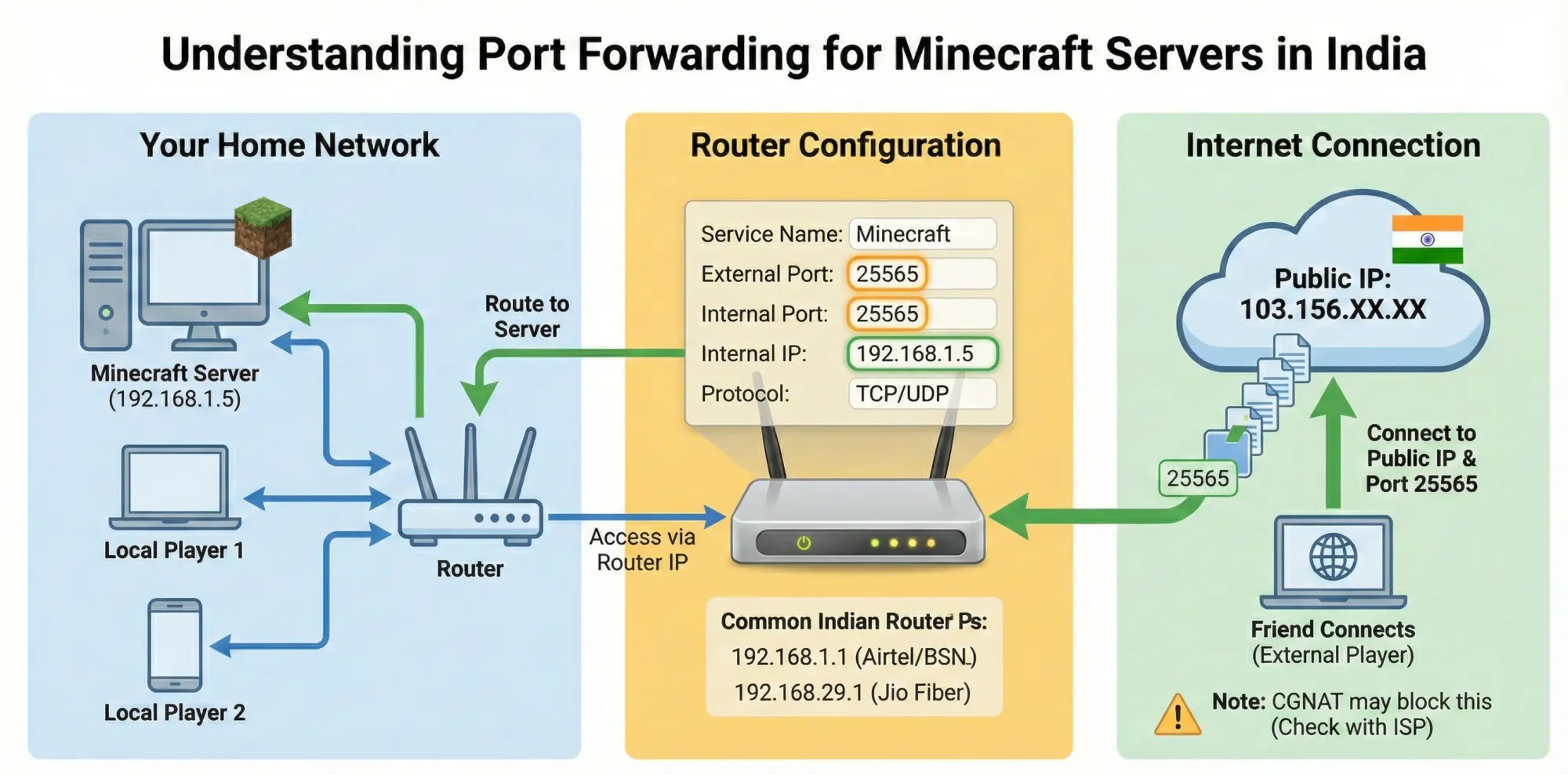
- Create Port Forwarding Rule
Navigate to "Port Forwarding" or "Virtual Server" section:
- Service Name: Minecraft
- External Port: 25565
- Internal Port: 25565
- Internal IP: Your computer's IP (from step 1)
- Protocol: TCP/UDP (or Both)
- Find Your Public IP
Visit whatismyipaddress.com to get your public IP.
Your Server IP = Your Public IP:25565
Example: 103.156.XX.XX:25565
Step 6: Testing Your Server
- Start your server (run start.bat/start.sh)
- Wait for "Done!" message in console
- Open Minecraft and try connecting with
localhost - Ask a friend to connect with your public IP
Pros and Cons of Self-Hosting in India
Advantages:
- Completely free (except electricity)
- Full control over files and settings
- Good learning experience
- Instant setup (no waiting for registrations)
Disadvantages:
- Requires powerful computer (expensive hardware)
- High electricity costs in India (Rs. 1,500-3,000/month for 24/7 operation)
- Internet upload speed limitations (most Indian ISPs: 10-50 Mbps upload)
- DDoS attack risk (direct IP exposure)
- Port forwarding doesn't work with CGNAT (common in India)
- Server offline when PC is off or internet drops
- No automatic backups
- Family members complain about slow internet
The CGNAT Problem in India
Many Indian ISPs (especially Jio, Airtel mobile broadband) use CGNAT (Carrier-Grade NAT), which makes port forwarding impossible. Your public IP is shared with hundreds of other users, so external connections cannot reach your server.
How to check if you have CGNAT:
- Find your router's public IP (in router settings under "WAN IP" or "Internet IP")
- Compare with IP shown on whatismyipaddress.com
- If they don't match, you have CGNAT
CGNAT is common with:
- Jio Fiber (in some areas)
- Airtel 4G/5G hotspots
- Mobile tethering
- Some local ISPs
Solution: Request static/public IP from ISP (usually Rs. 500-1,000/month extra) or use hosting.
Realistic Expectations
What self-hosting works for:
- Testing plugins and configurations
- Playing with 2-5 local friends occasionally
- Learning server administration
- Temporary event servers (birthday parties, etc.)
What self-hosting doesn't work for:
- Public servers with 20+ players
- 24/7 availability
- Long-term communities
- Content creation (YouTube series, etc.)
- Protection from attacks
Reality check: If you're serious about running a server for more than a week, self-hosting will frustrate you within days. Power cuts, internet outages, and performance issues are guaranteed.
Method 2: Free Server Hosting
Available Free Hosting Options
Several platforms offer free Minecraft server hosting with limitations:
Aternos
Details:
- Website: aternos.org
- Cost: Completely free
- Player Limit: Unlimited (but performance-limited)
- Storage: 4 GB
- Server Location: Europe/Singapore (high ping from India)
How it works:
- Create account on Aternos
- Click "Create Server"
- Select Minecraft version and mods
- Start server (on-demand only)
Pros:
- Actually free (no hidden costs)
- Easy setup (no technical knowledge)
- Supports mods and plugins
- Automatic backups
Cons:
- Long startup queue (5-20 minutes wait in India)
- Automatic shutdown after inactivity (5 minutes)
- Manual start required every session
- Very high lag from India (150-250ms ping)
- Limited RAM (2-4 GB)
- In-game advertisements
- No 24/7 uptime
- Can't handle 10+ players
Minehut
Details:
- Website: minehut.com
- Cost: Free (paid upgrades available)
- Player Limit: 10 (free) / unlimited (paid)
- Storage: 5 GB
- Server Location: USA/Europe
Pros:
- No queue system (starts instantly)
- Good control panel
- Plugin installation through dashboard
- Free backups
Cons:
- Extremely high ping from India (200-300ms)
- Performance issues with 8+ players
- Limited to specific plugin versions
- Aggressive monetization (constant upgrade prompts)
server.pro
Details:
- Website: server.pro
- Cost: Free with ads
- Player Limit: Varies
- Server Location: Multiple
Pros:
- Multiple server locations (Singapore available)
- Better ping than Aternos for India (80-120ms)
- Supports plugins
Cons:
- Must watch ads to start server
- Queue during peak hours
- Limited to 12 players free tier
The Reality of Free Hosting
Free hosting sounds appealing, but here's what actually happens:
Week 1: "This is great! Free server for my friends."
Week 2: Players complain about lag. Server randomly shuts down mid-game.
Week 3: Frustrated with startup queues and waiting. Looking for alternatives.
Week 4: Server abandoned or migrated to paid hosting.
When free hosting makes sense:
- Testing server concepts before committing
- Temporary servers (one-time events)
- Learning server administration basics
- Absolute budget constraint (Rs. 0)
When free hosting doesn't work:
- Any serious community building
- Regular scheduled playing times
- More than 5-8 concurrent players
- Indian player base (ping issues)
- Long-term projects
Method 3: Professional Managed Hosting
What is Managed Hosting?
Managed hosting means a company provides dedicated server hardware, handles technical setup, offers control panel access, and ensures 24/7 uptime. You simply configure your server through a web dashboard without dealing with port forwarding, Java installation, or hardware maintenance.
Why Most Server Owners Choose Hosting
After trying self-hosting or free options, most serious server owners migrate to professional hosting because:
Technical Simplification:
- No port forwarding required
- No router configuration
- No CGNAT problems
- No Java installation or updates
- One-click server creation
Performance Benefits:
- Dedicated resources (not shared with other users)
- SSD/NVMe storage (10x faster world loading)
- Enterprise CPUs (Ryzen 9, Intel i9)
- High-speed network connections
- Low latency in India (8-15ms from Mumbai)
Reliability:
- 24/7 uptime (server never sleeps)
- DDoS protection (enterprise-grade)
- Automatic backups (daily/weekly)
- Professional support (ticket systems, live chat)
- No power cut or internet outage disruptions
Cost Reality:
- Self-hosting electricity: Rs. 1,500-3,000/month
- Professional hosting: Rs. 299-899/month
- Hosting is often cheaper than 24/7 self-hosting
Choosing a Hosting Provider in India
Not all hosting providers are equal. Here's what matters for Indian servers:
1. Server Location
Critical for latency. Players expect:
- India (Mumbai/Delhi): 8-15ms ping
- Singapore: 50-80ms ping
- Europe/USA: 150-300ms ping
Always choose India-based providers for Indian player base.
2. DDoS Protection
Minecraft servers are frequent DDoS targets. Basic protection (5-20 Gbps) is inadequate. Look for enterprise-grade protection:
- Cloudflare Spectrum integration
- Multi-Tbps capacity
- Layer 7 application protection
- IP masking/proxy
3. Hardware Quality
Server performance depends on CPU single-core speed:
- AMD Ryzen 9 7950X: Excellent (5.7 GHz boost)
- Intel Core i9-13900K: Excellent (5.8 GHz boost)
- AMD Ryzen 5/7 older gen: Good
- Intel Xeon (older): Poor for Minecraft
NVMe SSD vs SATA SSD:
- NVMe: 3,500+ MB/s read speed (instant chunk loading)
- SATA SSD: 550 MB/s read speed (slower)
- HDD: Unacceptable for Minecraft (causes severe lag)
4. Control Panel
Pterodactyl is the industry standard:
- File manager with web interface
- Console access
- Automatic startup/crash recovery
- User management
- Database creation (MySQL)
- SFTP access
Avoid providers using outdated panels (Multicraft) or no panel.
5. Support Quality
Test before buying:
- Response time (under 2 hours for tickets)
- Support channels (tickets, live chat, Discord)
- Hindi/English availability
- Timezone coverage (IST working hours)
GBNODES: India's Leading Minecraft Hosting
Pricing (2026):
| Plan | RAM | CPU | Storage | Players | Price/Month |
|---|---|---|---|---|---|
| Starter | 2 GB | 2 cores | 10 GB NVMe | 10-20 | Rs. 299 |
| Basic | 4 GB | 3 cores | 20 GB NVMe | 20-40 | Rs. 499 |
| Standard | 8 GB | 4 cores | 40 GB NVMe | 40-80 | Rs. 899 |
| Advanced | 16 GB | 6 cores | 80 GB NVMe | 80-150 | Rs. 1,599 |
Why GBNODES:
Infrastructure:
- Mumbai and Noida owned datacenters (not reselling)
- AMD Ryzen 9 7950X processors (best single-core performance)
- NVMe SSD storage (10x faster than competitors' SATA)
- 1 Gbps network uplink (zero bandwidth throttling)
GBSHIELD DDoS Protection:
- Powered by Cloudflare Spectrum (multi-Tbps capacity)
- Protects against attacks exceeding 30 Tbps
- Layer 3/4 and Layer 7 protection
- IP masking (origin server hidden)
- Only Indian provider with Cloudflare Spectrum
Recognition:
- Featured in Forbes Advisor: Top 10 Best Minecraft Server Hosting Globally
- Only Indian provider to achieve this honor
- Powers mcFleet.net (India's largest server - 5,000+ concurrent players)
- Trusted by 50M+ combined YouTube subscribers
What's Included:
- Custom Pterodactyl control panel
- MySQL database access
- Automatic daily backups
- Subdomain (yourserver.gbnodes.host)
- Instant setup (2-5 minutes)
- 99.99% uptime SLA
- 24/7 support (English & Hindi)
- No setup fees or hidden costs
Payment Methods:
- UPI (instant activation)
- Paytm wallet
- Credit/Debit cards
- Net banking (NEFT/RTGS)
Other Hosting Providers in India
Budget Options (Rs. 200-500/month):
Pros: Lowest price point
Cons:
- Basic DDoS protection (5-20 Gbps)
- Shared nodes (performance varies)
- SATA SSD or HDD storage
- Limited support quality
- Reselling from overseas
When to consider: Small friend server (under 10 players), temporary projects, absolute budget constraint
International Premium (Rs. 800-1,500/month):
Providers like Apex Hosting, BisectHosting with India nodes:
Pros:
- Global brand recognition
- Established track record
Cons:
- Priced in USD/EUR (currency conversion)
- 2-3x more expensive than GBNODES for same specs
- International company (India not primary focus)
- No UPI payment
- No Hindi support
When to consider: International community (players from multiple countries), budget not a concern
Hardware Requirements by Player Count
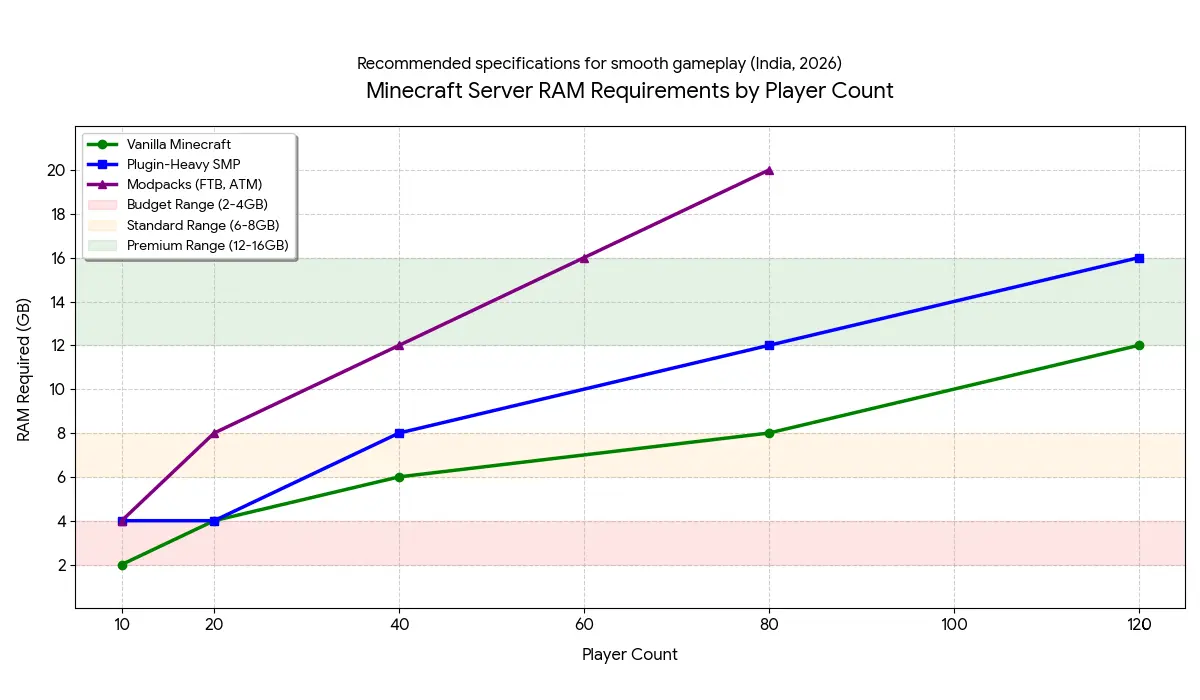
Choosing the right server size prevents lag and wasted money. Here's realistic sizing:
Vanilla Minecraft (No Mods, Minimal Plugins)
| Players | RAM | CPU Cores | Storage | Example Price |
|---|---|---|---|---|
| 5-10 | 2 GB | 2 cores | 10 GB | Rs. 299/mo |
| 10-20 | 4 GB | 2-3 cores | 20 GB | Rs. 499/mo |
| 20-40 | 6 GB | 3-4 cores | 30 GB | Rs. 699/mo |
| 40-80 | 8 GB | 4 cores | 40 GB | Rs. 899/mo |
Modded Minecraft (FTB, Tekkit, ATM)
| Players | RAM | CPU Cores | Storage | Example Price |
|---|---|---|---|---|
| 5-10 | 4 GB | 3 cores | 20 GB | Rs. 499/mo |
| 10-20 | 8 GB | 4 cores | 40 GB | Rs. 899/mo |
| 20-40 | 12 GB | 5 cores | 60 GB | Rs. 1,299/mo |
| 40+ | 16 GB+ | 6+ cores | 80 GB+ | Rs. 1,599+/mo |
Plugin-Heavy Servers (50+ plugins, Minigames)
| Players | RAM | CPU Cores | Storage | Example Price |
|---|---|---|---|---|
| 10-20 | 4 GB | 3 cores | 20 GB | Rs. 499/mo |
| 20-50 | 8 GB | 4 cores | 40 GB | Rs. 899/mo |
| 50-100 | 12 GB | 5 cores | 60 GB | Rs. 1,299/mo |
| 100-200 | 16 GB+ | 6+ cores | 80 GB+ | Rs. 1,599+/mo |
Special Cases
BedWars/Minigame Network:
- High CPU requirement (many simultaneous games)
- Moderate RAM (instances share memory)
- Recommend: 8GB RAM, 4+ cores for 50-100 players
Creative/Plot Servers:
- Very high RAM requirement (massive builds loaded in memory)
- High storage needs (thousands of player plots)
- Recommend: 12-16GB RAM, 80-160 GB storage
Survival SMP (Economy, Jobs, Land Claims):
- Moderate RAM (plugins add overhead)
- High storage (player data, logs, backups)
- Recommend: 6-8 GB RAM, 40-60 GB storage for 40-60 players
Common Problems in India (and Solutions)
Problem 1: High Ping Despite India Server
Symptoms: Players report 80-150ms ping even though server is in Mumbai.
Causes:
- Server actually in Singapore (provider lying about location)
- Poor ISP routing (BSNL especially)
- Player using VPN
- Server overloaded (CPU maxed out)
Solutions:
- Verify server location (ask provider for datacenter address)
- Test with different ISPs
- Check server TPS (should be 20, not 10-15)
- Upgrade server resources if needed
Problem 2: Cracked Players Can't Join
Symptoms: Premium players connect fine, cracked players get "Failed to verify username"
Solution:
In server.properties:
online-mode=false
Warning: Setting online-mode=false disables Mojang authentication. Anyone can join with any username. Use a whitelist or authentication plugin (AuthMe) for security.
Problem 3: "Can't Keep Up! Is the Server Overloaded?"
Symptoms: Console spam with lag warnings, players experience rubber-banding.
Causes:
- Too many players for allocated resources
- RAM insufficient
- Too many plugins
- Poorly optimized plugins (bad code)
- Entity overload (too many mobs)
Solutions:
- Check TPS with
/tpscommand (should be 20.0) - Install optimization plugins:
- ClearLagg (removes entities)
- StackMob (stacks mobs)
- FarmLimiter (limits farms)
- Reduce view-distance in server.properties (try 6-8)
- Upgrade server RAM/CPU
- Remove unnecessary plugins
- Use Paper instead of Spigot
Problem 4: World Corruption After Power Cut
Symptoms: Server won't start, world files corrupted, players spawning in void.
Cause: Self-hosted server shutting down improperly during save operation.
Solution:
- Always use proper shutdown command (
/stop) - Install UPS (Rs. 3,000-5,000) for graceful shutdown
- Or switch to professional hosting with automatic backups
Professional hosts have:
- RAID storage (data redundancy)
- Daily automatic backups
- Power redundancy (generators, UPS)
- Immediate restoration from backups
Problem 5: DDoS Attacks Taking Server Offline
Symptoms: Server becomes unreachable, timeout errors, router crashes.
Reality: Minecraft servers are frequent attack targets. Rival servers, banned players, or random trolls launch attacks.
Self-Hosting: Completely vulnerable. Your home IP is directly exposed. Attacks affect your entire household internet.
Budget Hosting: Basic protection (5-20 Gbps) works against small attacks but fails against large ones (50-100 Gbps).
Enterprise Hosting (GBNODES GBSHIELD): Cloudflare Spectrum (multi-Tbps) blocks even massive attacks. Server stays online.
Solution: Use hosting with enterprise DDoS protection, not basic residential internet or budget providers.
Which Method Should You Choose?
Choose Self-Hosting If:
- You want to learn server administration
- Playing with 2-5 friends occasionally (not daily)
- Budget is exactly Rs. 0
- You have no CGNAT and can port forward
- You accept the server will go offline frequently
- This is temporary (under 2 weeks)
Expected monthly cost: Rs. 0 (but electricity Rs. 1,500-3,000 if 24/7)
Choose Free Hosting If:
- Testing a server concept
- One-time event (birthday party, etc.)
- Playing with friends who tolerate lag
- Absolute budget constraint
- You don't mind queue times and restarts
Expected monthly cost: Rs. 0
Choose Budget Hosting (Rs. 200-500/mo) If:
- Small friend group (10-20 players maximum)
- Casual server (not serious community)
- Willing to accept moderate uptime (95-98%)
- Basic DDoS protection is acceptable
- Budget under Rs. 500/month
Expected monthly cost: Rs. 200-500
Choose Professional Hosting (GBNODES) If:
- Serious about building a community
- Want 24/7 uptime and reliability
- Indian player base (need low latency)
- 20+ concurrent players
- Content creation (YouTube, streaming)
- Can't afford downtime or attacks
- Want professional support
- Value time over money (setup in minutes, not hours)
Expected monthly cost: Rs. 299-899 (depends on player count)
Choose VPS (Advanced) If:
- You're experienced with Linux server administration
- Running multiple Minecraft servers (network)
- Want complete control over everything
- Can handle security, updates, backups yourself
- Cost optimization (Rs. 699 VPS = 2-3 game servers)
Expected monthly cost: Rs. 699+ (GBNODES VPS)
Not recommended for beginners.
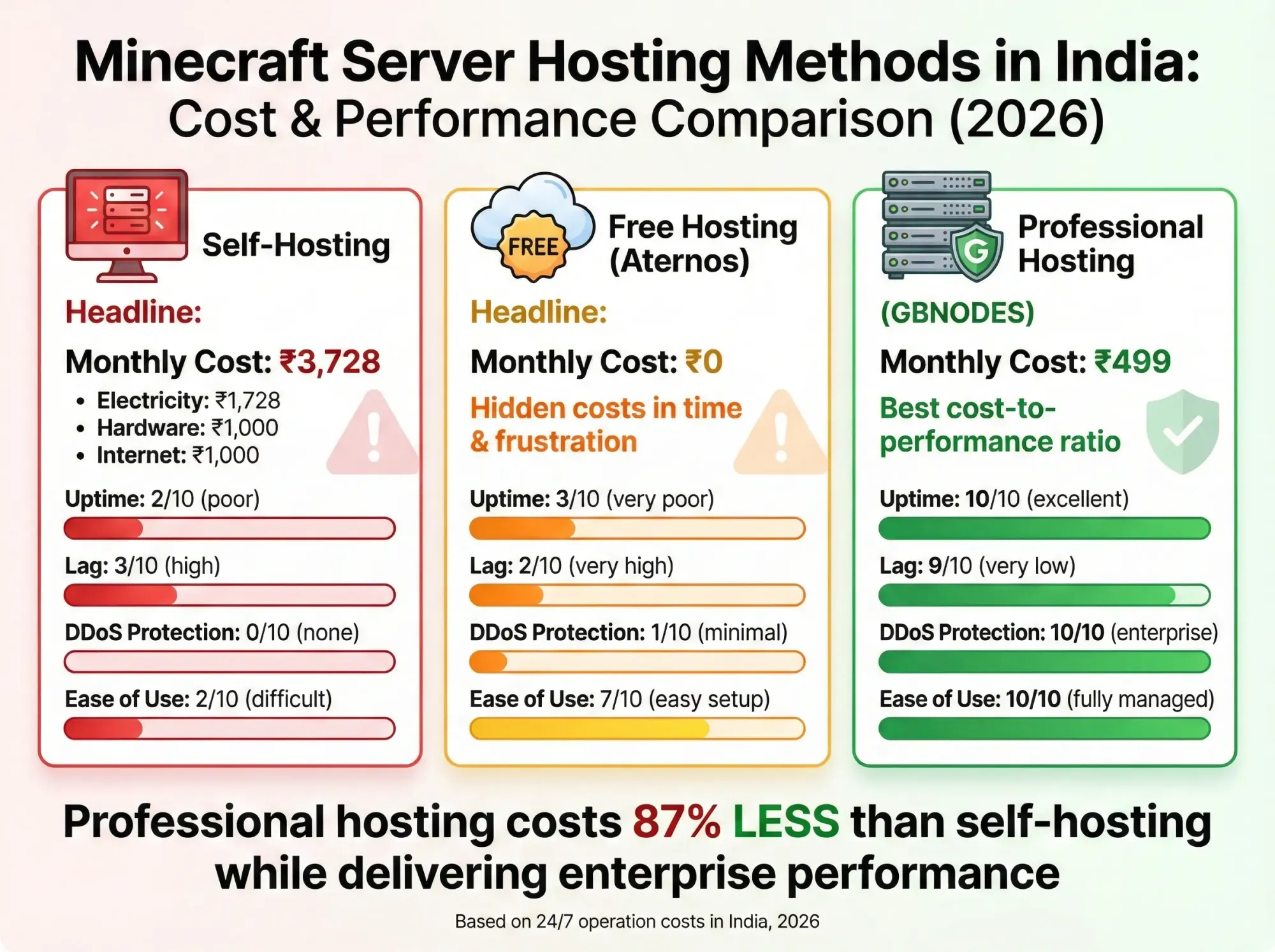
Realistic Cost Breakdown
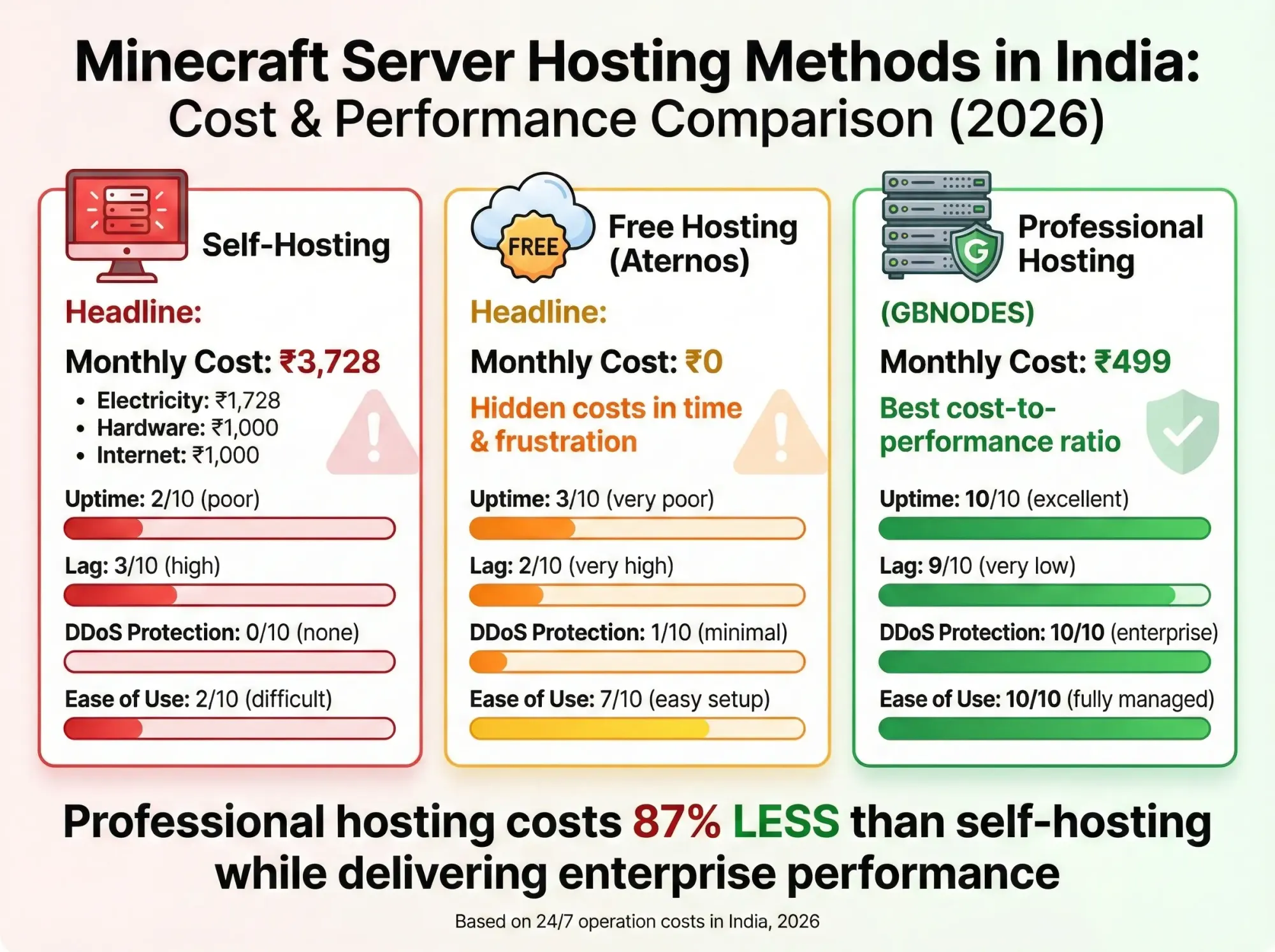
Self-Hosting (24/7):
- Computer depreciation: Rs. 1,000/month (Rs. 60,000 PC / 5 years)
- Electricity (300W 24/7 @ Rs. 8/unit): Rs. 1,728/month
- Internet (50 Mbps upload capable): Rs. 1,000/month
- Total: Rs. 3,728/month
Reality: Self-hosting costs MORE than professional hosting when calculated honestly.
Professional Hosting:
- GBNODES 4GB plan: Rs. 499/month
- DDoS protection: Included
- Backups: Included
- Support: Included
- Total: Rs. 499/month
Saves Rs. 3,229/month vs self-hosting while providing better uptime and performance.
FAQ
Q: What is the cheapest way to make a Minecraft server in India?
A: Free hosting (Aternos, Minehut) has zero cost but severe limitations (lag, queues, auto-shutdown). For serious servers, professional hosting (Rs. 299/month) is cheaper than 24/7 self-hosting (Rs. 3,700+/month in electricity and hardware costs).
Q: Can I host a Minecraft server for free in India?
A: Yes, using free hosting platforms like Aternos or server.pro. However, expect high ping (150-250ms from India), startup queues, automatic shutdowns, and poor performance with 10+ players. Good for testing; not suitable for long-term communities.
Q: How much does Minecraft server hosting cost in India?
A: Prices range from Rs. 199/month (budget providers, limited features) to Rs. 899/month (professional hosting with 8GB RAM, enterprise DDoS). GBNODES starts at Rs. 299/month for 2GB with GBSHIELD protection. International providers cost Rs. 800-1,500/month for equivalent specs.
Q: What are the requirements to host a Minecraft server?
A: For self-hosting: 8GB+ RAM, quad-core CPU, 10GB storage, 50 Mbps upload internet, Java 17, port forwarding access. For professional hosting: just a browser and Rs. 299/month (provider handles all technical requirements).
Q: Can I run a Minecraft server on my laptop in India?
A: Technically yes, but not recommended. Laptops overheat during prolonged load, have limited RAM, and server turns off when laptop closes or moves. Works for 1-2 hour sessions with friends, not for 24/7 communities.
Q: Why is my Minecraft server lagging even with good specs?
A: Common causes: View distance too high (reduce to 6-8), too many plugins, entities not being cleared (use ClearLagg), insufficient RAM allocation, or internet upload speed bottleneck. Check server TPS with /tps (should be 20.0).
Q: How many players can a 4GB Minecraft server handle?
A: Vanilla: 20-40 players. Plugin-heavy SMP: 15-25 players. Modpacks: 10-15 players. Performance depends on CPU quality, optimization (Paper vs Spigot), plugin efficiency, and view distance settings.
Q: Do I need a domain for my Minecraft server?
A: No, but it helps. Instead of players typing 103.156.XX.XX:25565, they type play.yourserver.com. Most hosting providers include free subdomains (e.g., yourserver.gbnodes.host). Custom domains cost Rs. 800-1,500/year.
Q: What is the best server software for Minecraft in India?
A: Paper (performance-optimized, supports plugins), Spigot (stable, plugin support), or Fabric (modern modding). Avoid vanilla for public servers (no plugin support, poor performance). For modpacks, use recommended server software (Forge, Fabric, etc.).
Q: Can cracked players join my server?
A: Only if you set online-mode=false in server.properties. This disables Mojang authentication. Use authentication plugins (AuthMe Reloaded) for security. Professional hosts like GBNODES support both cracked and premium configurations.
Q: How do I protect my Minecraft server from DDoS attacks?
A: Self-hosting has zero protection (attacks down your home internet). Budget hosting (5-20 Gbps) works against small attacks only. Enterprise hosting like GBNODES GBSHIELD (Cloudflare Spectrum with multi-Tbps capacity) blocks even massive attacks. Never expose your origin IP publicly.
Q: Which hosting is better: Indian or international?
A: For Indian player base, choose Indian hosting (Mumbai/Delhi servers = 8-15ms ping vs 150-300ms from USA/Europe). International hosting costs 2-3x more due to USD/EUR pricing and offers no benefit for India-focused communities. GBNODES (India) offers comparable quality to international providers at half the cost.
Conclusion
Creating a Minecraft server in India comes down to a simple truth: you can spend weeks fighting technical issues with self-hosting and free options, or you can spend Rs. 299/month and start building your community immediately.
The numbers don't lie. Self-hosting costs Rs. 3,700+/month when electricity and hardware depreciation are calculated honestly. Professional hosting costs Rs. 299-899/month and provides better uptime, performance, and support.
For serious server owners, the question isn't whether to use professional hosting, but which provider to choose. With GBSHIELD DDoS protection, Forbes recognition, and infrastructure powering India's largest servers (mcFleet.net), GBNODES offers enterprise-grade reliability at prices accessible to Indian server owners.
Start Your Minecraft Server on GBNODES
Further Reading:
- Best Minecraft Server Hosting India 2026 Comparison
- mcFleet.net Server IP & Join Guide
- Lillyville SMP & GamerFleet Servers
Last Updated: February 2026 | All pricing and technical details verified current