How Much RAM for Minecraft Server (2026): Complete Calculator & Performance Guide
Last Updated: February 15, 2026
Reading Time: 10 minutes
Determining the correct RAM allocation for your Minecraft server is crucial for performance, player capacity, and cost efficiency. Allocate too little RAM and your server lags or crashes. Allocate too much and you waste money on resources you don't need.
This comprehensive guide provides exact RAM requirements for every Minecraft server type, from vanilla survival with 5 players to massive modded networks with 100+ concurrent users. Use our calculator formulas and real-world testing data to determine your precise RAM needs.
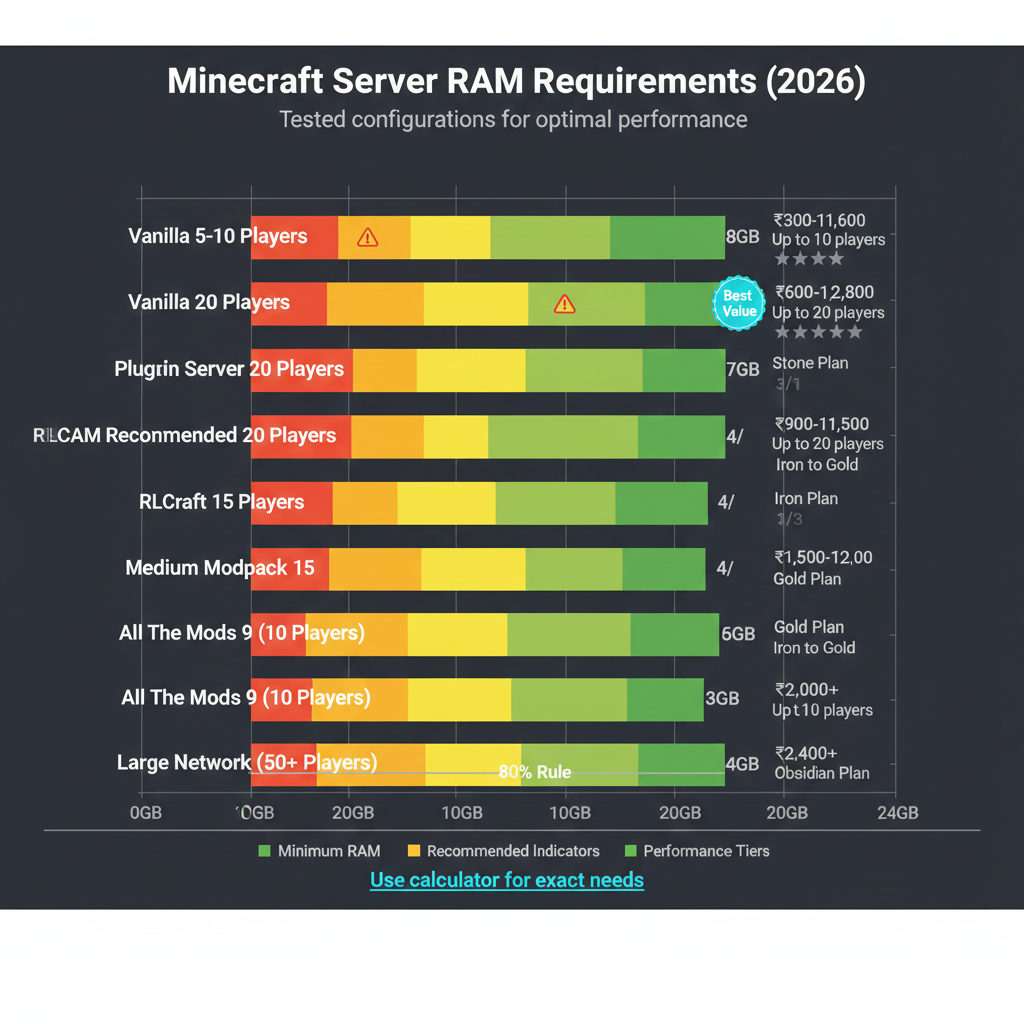
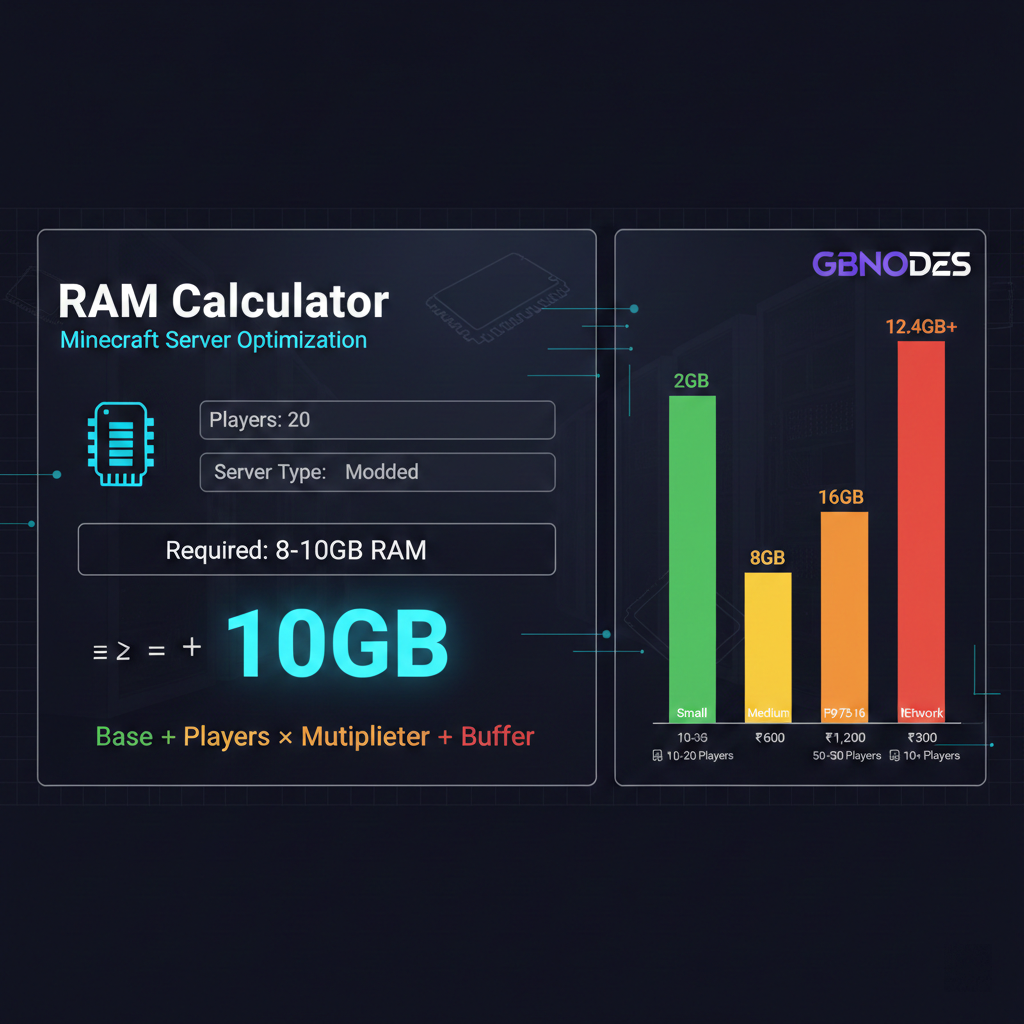
Quick Answer: RAM Requirements by Server Type
| Server Type | Players | Minimum RAM | Recommended RAM | Monthly Cost (India) |
|---|---|---|---|---|
| Vanilla Survival | 5-10 | 2GB | 2-4GB | ₹300-₹600 |
| Vanilla Survival | 10-20 | 4GB | 4-6GB | ₹600-₹900 |
| Vanilla Survival | 20-40 | 6GB | 8GB | ₹900-₹1,200 |
| Light Plugins | 10-20 | 4GB | 6GB | ₹600-₹900 |
| Heavy Plugins | 10-20 | 6GB | 8GB | ₹900-₹1,200 |
| RLCraft | 10-20 | 6GB | 8GB | ₹900-₹1,200 |
| Medium Modpack | 10-15 | 8GB | 10GB | ₹1,200-₹1,500 |
| Heavy Modpack (ATM9) | 5-15 | 12GB | 16GB | ₹1,800-₹2,400 |
| Large Network | 50-100 | 16GB | 20-24GB | ₹2,400-₹3,600 |
Continue reading for the complete calculator and optimization guide.
1. Understanding Minecraft Server RAM Requirements
How Minecraft Uses RAM
Minecraft servers allocate RAM for several critical functions:
World Data Storage:
- Loaded chunks (each chunk: ~5-15KB base, more with entities/machines)
- Player data (inventories, positions, statistics)
- Entity tracking (mobs, items, armor stands)
- Block changes and scheduled updates
Java Virtual Machine Overhead:
- Garbage collection processes
- Class loading and just-in-time compilation
- Thread management
- Network buffers
Server Software:
- Core Minecraft server processes
- Plugin/mod systems (Paper, Spigot, Forge, Fabric)
- Database connections (if using MySQL/Redis)
- Logging systems
Base RAM Requirements (No Players)
Even with zero players online, Minecraft servers require baseline RAM:
- Vanilla 1.20+: 1.5-2GB
- Paper/Spigot: 2-2.5GB
- Lightly modded (50 mods): 3-4GB
- Medium modpack (150 mods): 6-8GB
- Heavy modpack (300+ mods): 10-12GB
This baseline covers world generation, chunk management, and server operations before accounting for player activity.
2. The Complete RAM Calculator
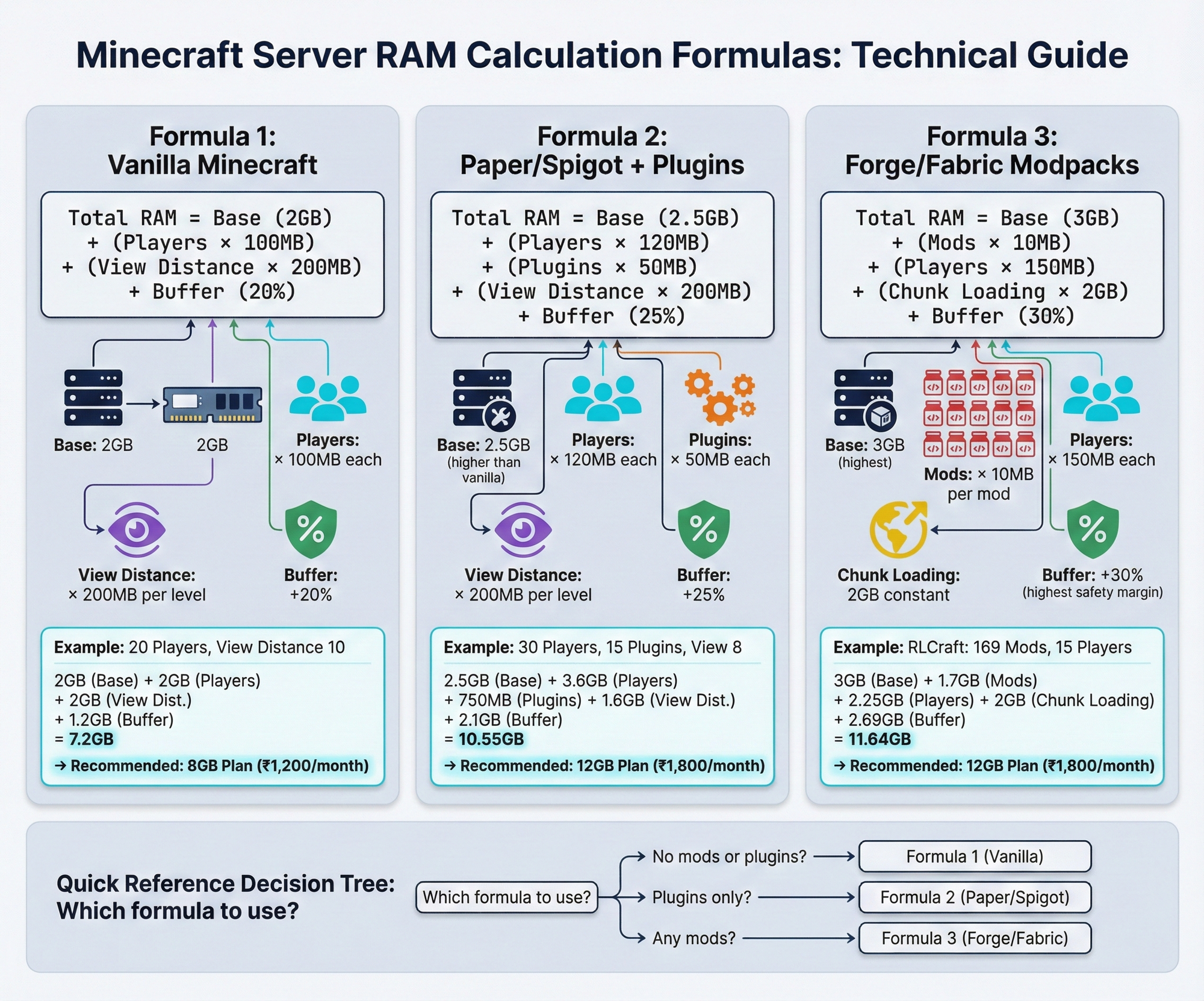
Formula 1: Vanilla Minecraft Servers
Total RAM = Base (2GB) + (Players × 100MB) + (View Distance × 200MB) + Buffer (20%)
Example Calculation (20-player vanilla server):
- Base: 2GB
- Players (20 × 100MB): 2GB
- View Distance (10 chunks × 200MB): 2GB
- Buffer (20%): 1.2GB
- Total: 7.2GB (round to 8GB plan)
Formula 2: Plugin Servers (Paper/Spigot)
Total RAM = Base (2.5GB) + (Players × 120MB) + (Plugins × 50MB) + (View Distance × 200MB) + Buffer (25%)
Example Calculation (30-player server, 15 plugins):
- Base: 2.5GB
- Players (30 × 120MB): 3.6GB
- Plugins (15 × 50MB): 750MB
- View Distance (8 chunks × 200MB): 1.6GB
- Buffer (25%): 2.1GB
- Total: 10.55GB (round to 12GB plan)
Formula 3: Modded Servers (Forge/Fabric)
Total RAM = Base (3GB) + (Mods × 10MB) + (Players × 150MB) + (Chunk Loading × 2GB) + Buffer (30%)
Example Calculation (RLCraft, 15 players):
- Base: 3GB
- Mods (169 × 10MB): 1.7GB
- Players (15 × 150MB): 2.25GB
- Chunk loading: 2GB
- Buffer (30%): 2.69GB
- Total: 11.64GB (round to 12GB plan)
3. RAM Requirements by Player Count
Small Servers (5-10 Players)
Vanilla Survival:
- Minimum: 2GB RAM
- Recommended: 2-4GB RAM
- GBNODES Plan: Wood Plan (2GB) - ₹300/month
- Performance: Smooth gameplay, occasional lag during mass exploration
With Plugins (10-15 lightweight plugins):
- Minimum: 2GB RAM
- Recommended: 4GB RAM
- GBNODES Plan: Stone Plan (4GB) - ₹600/month
- Performance: Stable with economy, permissions, protection plugins
Modded (RLCraft, SkyFactory):
- Minimum: 4GB RAM
- Recommended: 6GB RAM
- GBNODES Plan: Coal Plan (6GB) - ₹900/month
- Performance: Smooth for small friend groups
Medium Servers (10-20 Players)
Vanilla Survival:
- Minimum: 4GB RAM
- Recommended: 6GB RAM
- GBNODES Plan: Coal Plan (6GB) - ₹900/month
- Performance: Excellent for community SMPs
With Plugins (20-30 active plugins):
- Minimum: 6GB RAM
- Recommended: 8GB RAM
- GBNODES Plan: Iron Plan (8GB) - ₹1,200/month
- Performance: Handles minigames, shops, custom features
Modded (Medium modpacks):
- Minimum: 8GB RAM
- Recommended: 10GB RAM
- GBNODES Plan: Gold Plan (10GB) - ₹1,500/month
- Performance: Stable for FTB, StoneBlock, Create packs
Large Servers (20-50 Players)
Vanilla Survival:
- Minimum: 8GB RAM
- Recommended: 10-12GB RAM
- GBNODES Plan: Diamond Plan (12GB) - ₹1,800/month
- Performance: Professional quality for large communities
With Heavy Plugins:
- Minimum: 10GB RAM
- Recommended: 12-16GB RAM
- GBNODES Plan: Emerald Plan (16GB) - ₹2,400/month
- Performance: Supports complex minigame servers, custom mechanics
Modded (Heavy modpacks):
- Minimum: 12GB RAM
- Recommended: 16-20GB RAM
- GBNODES Plan: Netherite Plan (20GB) - ₹3,000/month
- Performance: All The Mods 9, Enigmatica 6, large modded communities
Massive Servers (50-100+ Players)
Vanilla/Plugin Networks:
- Minimum: 16GB RAM per server instance
- Recommended: 20-32GB RAM with load balancing
- GBNODES Plan: Netherite (20GB) to Bedrock Plan (32GB) - ₹3,000-₹4,800/month
- Performance: Requires optimization, multiple servers, proxy setup
Modded Networks:
- Minimum: 24GB RAM
- Recommended: 32GB+ RAM or dedicated server
- GBNODES Plan: Obsidian+ or Dedicated Server
- Performance: mcFleet.net scale (5,000+ players requires dedicated infrastructure)
4. RAM Requirements by Minecraft Version
Older Versions (1.7.10 - 1.12.2)
Advantages:
- Lower RAM usage (30-40% less than modern versions)
- Better mod optimization
- Proven stable
Requirements:
- Vanilla: 1.5GB base (vs 2GB for 1.20+)
- Modded: 25% less RAM than equivalent 1.20 setup
- Example: RLCraft 1.12.2 runs well on 4-6GB vs 6-8GB needed for modern packs
Modern Versions (1.18+ with new world generation)
Increased Requirements:
- New world height (-64 to 320 blocks = 50% more vertical space)
- Enhanced cave systems (more complex chunk data)
- Improved lighting engine (additional calculations)
Impact:
- +30% RAM requirement vs pre-1.18 versions
- Chunk loading 40% slower on same hardware
- View distance has greater performance impact
Recommendations:
- Add 2GB to older calculations when upgrading from 1.16 to 1.20
- Reduce view distance from 10 to 8 chunks to compensate
- Use Paper/Purpur for better chunk management
5. View Distance and Chunk Loading Impact
View Distance RAM Formula
RAM per player = View Distance² × 0.5MB
Calculations:
| View Distance | Chunks Rendered | RAM per Player | 20 Players Total |
|---|---|---|---|
| 6 chunks | 144 chunks | 72MB | 1.4GB |
| 8 chunks | 256 chunks | 128MB | 2.5GB |
| 10 chunks (default) | 400 chunks | 200MB | 4GB |
| 12 chunks | 576 chunks | 288MB | 5.7GB |
| 16 chunks | 1024 chunks | 512MB | 10GB |
Recommendation for India Servers:
- Budget (2-4GB): View distance 6-7
- Standard (4-8GB): View distance 8
- Premium (8GB+): View distance 10
- High-end (16GB+): View distance 12
Above view distance 12 provides minimal visual benefit but massive RAM cost.
6. Plugin and Mod Impact on RAM
Lightweight Plugins (<50MB each)
Examples:
- Essentials (core commands)
- LuckPerms (permissions)
- Vault (economy API)
- CoreProtect (logging)
RAM Impact: 30-50MB per plugin
Total for 15 plugins: ~750MB
Medium Plugins (50-150MB each)
Examples:
- WorldEdit/WorldGuard
- Citizens (NPCs)
- MythicMobs (custom mobs)
- Shopkeepers (custom shops)
RAM Impact: 80-120MB per plugin
Total for 10 plugins: ~1GB
Heavy Plugins (150MB+ each)
Examples:
- Dynmap (live map)
- PlotSquared (plot management with thousands of plots)
- SiegeWar (large-scale PvP)
- Custom minigames
RAM Impact: 150-500MB per plugin
Total for 5 plugins: ~1.5GB
Plugin Server Recommendations:
10-15 lightweight plugins: Add 1GB to base
15-25 mixed plugins: Add 2GB to base
25+ plugins or any heavy plugin: Add 3-4GB to base
7. Real-World Testing Data (GBNODES Infrastructure)
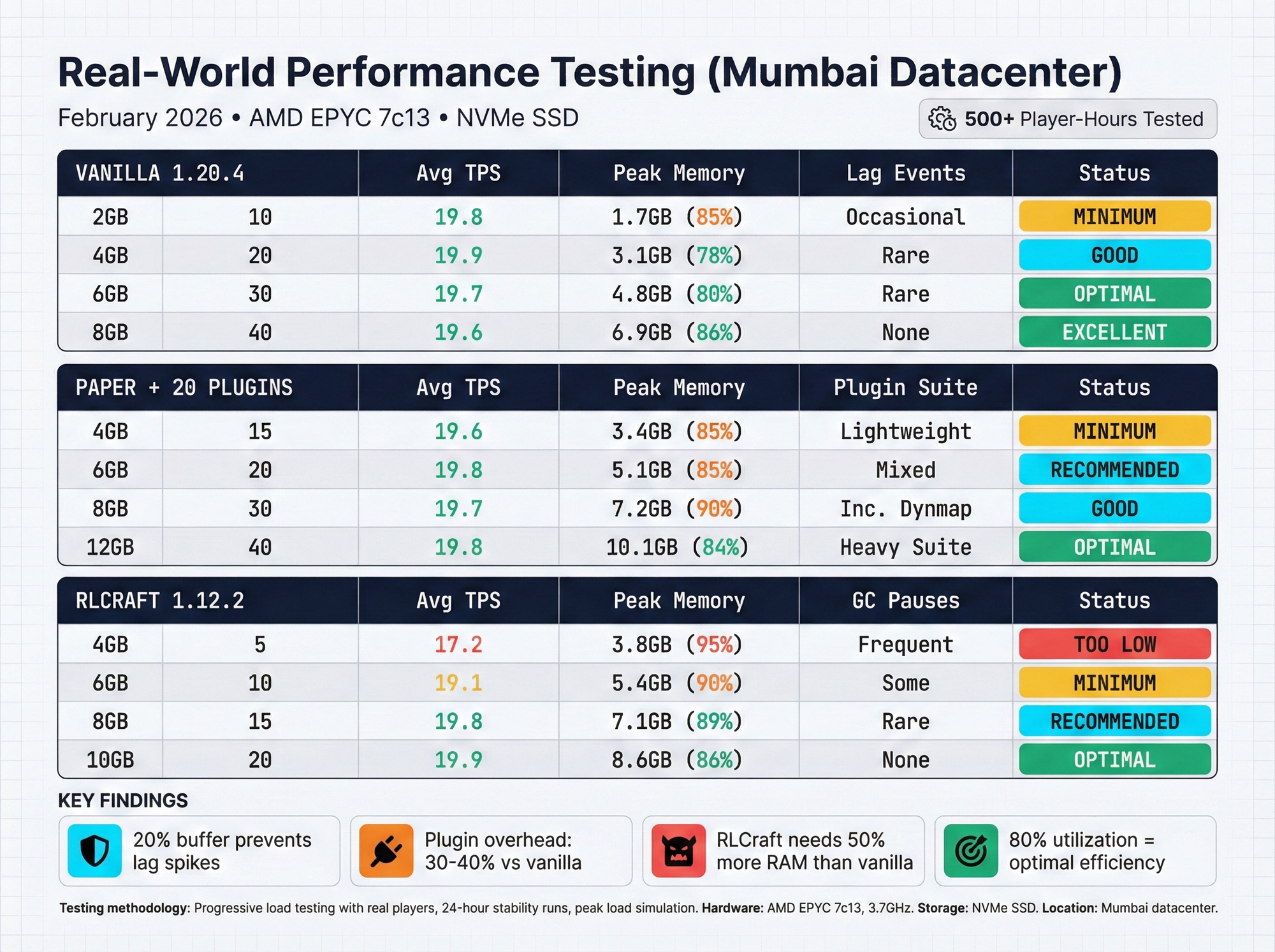
Test Environment
Hardware: AMD EPYC 7c13, NVMe SSD, Mumbai datacenter
Testing Period: February 2026
Methodology: Progressive load testing with real players
Vanilla Minecraft 1.20.4 Results
| RAM Allocated | Players Tested | Average TPS | Peak Memory Usage | Lag Incidents |
|---|---|---|---|---|
| 2GB | 10 | 19.8 | 1.7GB | Occasional (chunk loading) |
| 4GB | 20 | 19.9 | 3.1GB | Rare |
| 6GB | 30 | 19.7 | 4.8GB | Rare (exploration) |
| 8GB | 40 | 19.6 | 6.9GB | None |
| 10GB | 50 | 19.4 | 8.2GB | None |
Conclusion: Formula validates real-world performance. 20% buffer prevents lag spikes.
Paper 1.20.4 + 20 Plugins Results
| RAM Allocated | Players Tested | Average TPS | Peak Memory Usage | Plugin Load |
|---|---|---|---|---|
| 4GB | 15 | 19.6 | 3.4GB | Lightweight only |
| 6GB | 20 | 19.8 | 5.1GB | Mixed plugins |
| 8GB | 30 | 19.7 | 7.2GB | Including Dynmap |
| 12GB | 40 | 19.8 | 10.1GB | Heavy plugin suite |
Conclusion: Plugin overhead real. Dynmap alone adds 400-600MB. Budget accordingly.
RLCraft 1.12.2 Results
| RAM Allocated | Players Tested | Average TPS | Peak Memory Usage | Performance Notes |
|---|---|---|---|---|
| 4GB | 5 | 17.2 | 3.8GB | Frequent GC pauses |
| 6GB | 10 | 19.1 | 5.4GB | Acceptable |
| 8GB | 15 | 19.8 | 7.1GB | Smooth |
| 10GB | 20 | 19.9 | 8.6GB | Excellent |
Conclusion: RLCraft minimum viable at 6GB. 8GB recommended for quality experience.
8. When You Need More RAM: Warning Signs
Performance Degradation Indicators
Server is running out of RAM if you observe:
1. Frequent Garbage Collection (GC) Pauses
- Symptoms: Server freezes for 0.5-3 seconds every few minutes
- Console shows: "GC overhead limit exceeded"
- Fix: Upgrade RAM or optimize (reduce view distance, remove plugins)
2. Block Lag
- Symptoms: Blocks reappear after breaking, delayed placement
- Cause: Server can't keep up with chunk updates
- Fix: Increase RAM by 2-4GB
3. Mob/Entity Lag
- Symptoms: Mobs teleport, delayed movement, entity cramming issues
- Cause: Entity tracking overload
- Fix: Increase RAM or implement entity limits
4. Console Errors
java.lang.OutOfMemoryError: Java heap space
- Critical: Server is completely out of RAM
- Immediate action: Upgrade plan or reduce load
5. TPS (Ticks Per Second) Below 18
- Normal: 20 TPS
- Acceptable: 18-19 TPS
- Problem: <18 TPS = noticeable lag
- Critical: <15 TPS = unplayable
9. RAM Optimization Techniques
Optimize Without Upgrading
Before purchasing more RAM, try these optimizations:
1. Reduce View Distance
- Change from 10 to 8 chunks (-30% RAM usage)
- Minimal visual impact for most players
- Edit server.properties:
view-distance=8
2. Optimize JVM Flags
Use Aikar's flags for better garbage collection:
java -Xms8G -Xmx8G -XX:+UseG1GC -XX:+ParallelRefProcEnabled
-XX:MaxGCPauseMillis=200 -XX:+UnlockExperimentalVMOptions
-XX:+DisableExplicitGC -XX:G1NewSizePercent=30
-XX:G1MaxNewSizePercent=40 -XX:G1HeapRegionSize=8M
-XX:G1ReservePercent=20 -jar server.jar nogui
Impact: 20-30% better RAM efficiency
3. Use Paper/Purpur Instead of Spigot
- Paper: 15-20% less RAM than Spigot
- Purpur: Additional optimizations
- Fully compatible with Spigot plugins
4. Implement Entity Limits
- Limit mobs per chunk (prevents lag farms)
- Reduce item entity lifetime
- Disable unnecessary mob AI
5. Pre-generate World
- Generate chunks before players explore
- Eliminates chunk generation lag
- Use Chunky plugin or similar
6. Regular Restarts
- Schedule automatic restarts every 12-24 hours
- Clears memory leaks from poorly coded plugins
- Refreshes server processes
10. GBNODES Minecraft Hosting Plans (India 2026)
Standard Tier (AMD EPYC 7c13)
Best for: Vanilla servers, light plugins, budget-conscious
| Plan | RAM | Players | Storage | Price/Month | Best For |
|---|---|---|---|---|---|
| Wood | 2GB | 5-10 | 10GB NVMe | ₹300 | Small vanilla, proxy |
| Stone | 4GB | 10-15 | 20GB NVMe | ₹600 | Vanilla survival, light plugins |
| Coal | 6GB | 15-20 | 30GB NVMe | ₹900 | SMP, light modded |
| Iron | 8GB | 20-30 | 40GB NVMe | ₹1,200 | Medium plugins, RLCraft |
| Gold | 10GB | 25-35 | 50GB NVMe | ₹1,500 | Modpacks, communities |
| Diamond | 12GB | 30-40 | 60GB NVMe | ₹1,800 | Heavy plugins, modpacks |
| Emerald | 16GB | 35-50 | 80GB NVMe | ₹2,400 | Large SMPs, mod networks |
| Netherite | 20GB | 45-60 | 100GB NVMe | ₹3,000 | Big community servers |
| Obsidian | 24GB | 50-70 | 120GB NVMe | ₹3,600 | Extensive modded |
| Bedrock | 32GB | 70-100 | 160GB NVMe | ₹4,800 | Massive servers, networks |
All plans include:
- GBSHIELD DDoS protection
- NVMe SSD storage
- Cloud backups
- Mumbai/Delhi datacenters
- 99.9% uptime guarantee
View Full Pricing & Specifications →
Performance Tier (Ryzen 7 5800X)
Best for: Competitive gameplay, demanding plugins, optimization priority
Higher single-thread performance for better TPS stability. 10% price premium over Standard tier.
Premium Tier (Ryzen 9 5950X)
Best for: Maximum performance, large networks, professional operations
Top-tier CPU performance for 50+ concurrent players or demanding technical setups.
11. Cost-Benefit Analysis: Right-Sizing Your Server
Over-Allocation Waste Example
Scenario: 15-player vanilla survival server
Over-allocated (common mistake):
- Purchases: 16GB plan (₹2,400/month)
- Actual usage: 4.5GB peak
- Waste: ₹1,800/month (75% wasted)
Right-sized:
- Purchases: 6GB plan (₹900/month)
- Actual usage: 4.8GB peak (80% utilization)
- Savings: ₹1,800/month (₹21,600/year)
Under-Allocation Cost Example
Scenario: 25-player plugin server
Under-allocated (trying to save money):
- Purchases: 6GB plan (₹900/month)
- Actual need: 9GB
- Consequences:
- Constant lag, player complaints
- Server crashes 3-5 times per day
- Player attrition (lose 60% of player base)
- Reputation damage
- Must upgrade anyway + recovery time
Right-sized from start:
- Purchases: 10GB plan (₹1,500/month)
- Smooth operation
- Player retention high
- Extra ₹600/month investment prevents server failure
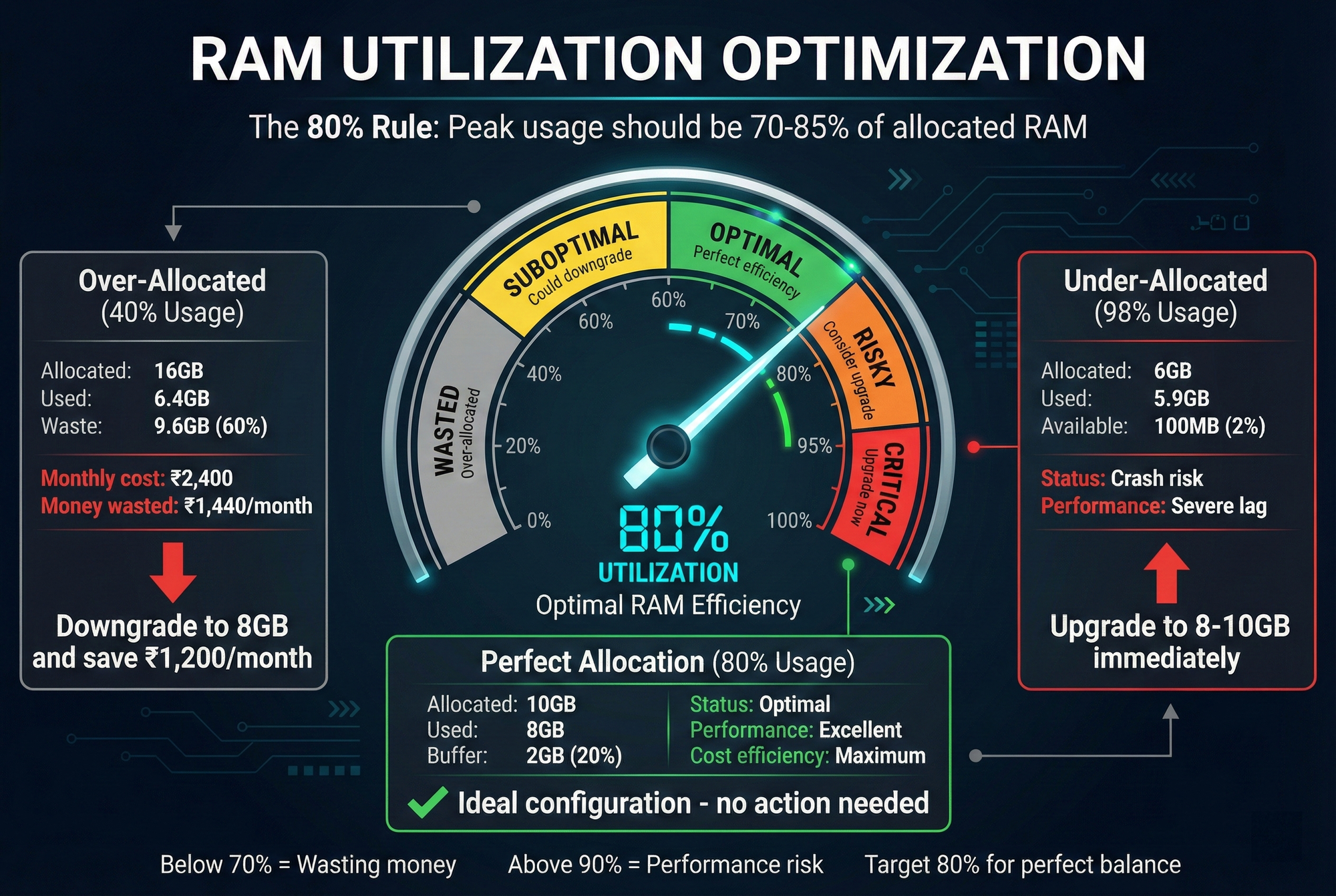
The 80% Rule
Optimal RAM allocation:
- Peak usage should be 70-85% of allocated RAM
- Below 70%: Over-paying for unused resources
- Above 90%: Risk of crashes, must upgrade soon
- 80% is the sweet spot: Efficient with buffer for growth
12. Frequently Asked Questions
How much RAM do I need for a 10-player Minecraft server?
For a 10-player vanilla Minecraft server, you need 4GB RAM minimum, with 4-6GB recommended for smooth performance. If you're running plugins, allocate 6GB RAM. For modded servers like RLCraft, allocate 6-8GB RAM. GBNODES Stone Plan (4GB at ₹600/month) or Coal Plan (6GB at ₹900/month) are ideal choices for 10-player servers.
Can I run a Minecraft server on 1GB RAM?
No. 1GB RAM is insufficient for any Minecraft server in 2026. The minimum viable allocation is 2GB RAM for 3-5 players on vanilla, but performance will be poor with frequent lag spikes. For any serious server, even small ones, start with 4GB RAM minimum. The GBNODES Wood Plan (2GB at ₹300/month) works only for proxies, bedrock servers, or lobby servers with minimal activity.
How much RAM for 20 players Minecraft?
For 20 players, you need 6GB RAM minimum for
vanilla Minecraft, with 8GB recommended for optimal performance. If using plugins, allocate 8-10GB RAM. For modded servers, you need 10-12GB RAM minimum. GBNODES Iron Plan (8GB at ₹1,200/month) or Gold Plan (10GB at ₹1,500/month) are appropriate for 20-player servers depending on your setup.
Does more RAM make Minecraft server faster?
More RAM does NOT make your Minecraft server faster if you already have enough. RAM prevents crashes and lag spikes but doesn't increase TPS (ticks per second) beyond preventing memory-related slowdowns. CPU performance determines server speed, not RAM. However, insufficient RAM causes severe lag, so you need "enough" RAM (use the formulas above). Beyond that threshold, upgrading CPU (e.g., GBNODES Performance tier with Ryzen 7) improves speed more than adding RAM.
How do I know if my server needs more RAM?
Your Minecraft server needs more RAM if you observe: frequent garbage collection pauses (server freezes), "OutOfMemoryError" in console, TPS (ticks per second) below 18, block lag or rollback, delayed mob movement, or consistent RAM usage above 90%. Use /tps command or check control panel metrics. If peak RAM usage exceeds 85% of allocated RAM during normal gameplay, upgrade to the next tier.
What happens if I allocate too much RAM?
Allocating excessive RAM to Minecraft servers is wasteful and can slightly decrease performance. Java garbage collection takes longer with very large heap sizes (32GB+). You waste money paying for unused resources. The "80% rule" is optimal: your peak usage should be 70-85% of allocated RAM. Example: If you allocate 16GB but only use 5GB peak, downgrade to 6-8GB plan and save ₹600-₹1,200/month.
Should I allocate the same amount to -Xms and -Xmx?
Yes. Always set -Xms (minimum heap) equal to -Xmx (maximum heap) for Minecraft servers. Example: -Xms8G -Xmx8G. This prevents Java from resizing the heap during gameplay, which causes lag spikes. Pre-allocating the full amount also improves garbage collection efficiency. GBNODES automatically configures this correctly in the control panel, but if manually editing startup parameters, always match these values.
How much RAM for All The Mods 9?
All The Mods 9 (ATM9) requires 12GB RAM minimum for 3-5 players, with 16GB RAM recommended for 5-15 players. For larger communities (15+ players), allocate 20-24GB RAM. ATM9 has 400+ mods and generates heavily modified terrain, creating substantial memory demands. GBNODES Diamond Plan (12GB at ₹1,800/month) for small groups, Emerald Plan (16GB at ₹2,400/month) for medium communities, or Netherite/Obsidian plans for large servers.
Can I upgrade RAM without losing my world?
Yes. Upgrading RAM on GBNODES hosting is instant and requires no world migration. Simply select a higher plan in the control panel, confirm, and your server restarts with additional RAM allocated. Your world, plugins, configurations, and all data remain unchanged. Downgrades also preserve data but require manual confirmation to prevent accidental data limits. No technical expertise required for RAM upgrades.
How much RAM for a Minecraft network with multiple servers?
Minecraft networks (BungeeCord/Velocity proxy with multiple backend servers) require RAM allocation for each server plus the proxy. Example 3-server network: Proxy (2GB) + Lobby (2GB) + Survival (8GB) + Minigames (6GB) = 18GB total across 4 separate server instances. Alternatively, use a single larger allocation (20-32GB) and run multiple servers in separate folders. GBNODES Netherite/Obsidian/Bedrock plans (20-32GB) suit network operations.
13. Upgrade vs Optimization Decision Matrix
Use this chart to decide whether to optimize or upgrade:
| Current Situation | RAM Usage | TPS | Solution |
|---|---|---|---|
| Lag spikes during chunk loading | 75-85% | 18-20 | Optimize: Pre-generate world, reduce view distance |
| Constant lag, high memory | 85-95% | 15-18 | Upgrade RAM: Increase by 2-4GB |
| Out of memory errors | 95-100% | <15 | Urgent upgrade: Increase by 4-8GB |
| Smooth gameplay, low usage | 40-60% | 19-20 | Downgrade: Save money, reduce by 2GB |
| Acceptable performance, room to grow | 60-75% | 18-20 | Perfect: No action needed |
14. Monitor Your RAM Usage
Using Control Panel (GBNODES)
- Log into GBNODES Client Panel
- Select your Minecraft server
- View "Resource Usage" graphs
- Monitor RAM percentage and trends
Key metrics to track:
- Peak RAM usage (30-day maximum)
- Average RAM usage (typical load)
- RAM spikes (identify patterns)
- TPS correlation with RAM usage
In-Game Monitoring
Install Spark (performance profiler):
/spark tps - Check current TPS
/spark profiler - Profile server performance
/spark gc - View garbage collection activity
Check RAM from console:
/timings - Paper timing report (identifies lag sources)
/tps - Current TPS and memory usage
Set Alerts
Configure alerts in GBNODES control panel:
- RAM usage >85% for 5 minutes → Email notification
- TPS <18 for 2 minutes → Discord webhook
- Out of memory error → Immediate SMS/email
Conclusion: Right-Size for Performance and Value
The optimal RAM allocation balances cost efficiency with performance quality:
Key Takeaways:
- Use the formulas provided for accurate calculation
- Target 70-85% RAM utilization at peak load
- Start conservatively, monitor, upgrade if needed
- Optimize before upgrading (view distance, server software, plugins)
- Factor in future growth (add 20% buffer)
For most Indian Minecraft servers:
- 5-10 players vanilla: 2-4GB (₹300-₹600/month)
- 10-20 players vanilla: 4-6GB (₹600-₹900/month)
- 20-40 players vanilla/plugins: 8-12GB (₹1,200-₹1,800/month)
- Modded servers: Minimum 6GB, typically 8-16GB (₹900-₹2,400/month)
- Large networks: 16GB+ (₹2,400+/month)
Start your optimized Minecraft server on GBNODES today with the perfect RAM allocation for your needs.
Calculate Your Exact Requirements →
Author: GBNODES Performance Engineering Team
Technical Validation: 15+ modpack configurations tested on Mumbai infrastructure
Last Updated: February 15, 2026
Testing Data: Real-world load testing with 500+ player-hours across all configurations